
A good voice only gets you halfway. The other half is the mic you’re speaking into, and if you’re jumping on conference calls or gaming sessions, a push-to-talk model is hard to beat.
Microphones are everywhere in daily life. We hear them on the radio, in movies, over public address systems, during conferences, and in two-way communications by phone.
That ubiquity has pushed a lot of innovation into specific microphone types, and the push-to-talk mic is one of the more practical ones. The idea is simple: an on/off button plus a built-in loudspeaker, so you never have to cup your hand over the capsule when you want to say something off the record.
Think of it as a pause-and-play button for your voice. One press decides what gets broadcast and what doesn’t.
The design traces back to two-way radio, and it’s still the standard for CB operators who need to hold a PTT switch while transmitting on the road. Running a CB rig?
We tested a bunch of models wired specifically for that in our best CB microphone guide.
These days, the most popular push-to-talk mics are USB models built for computers.
Quick Comparison Chart
| # | Product | Our Rating | ||
|---|---|---|---|---|
| 1 | 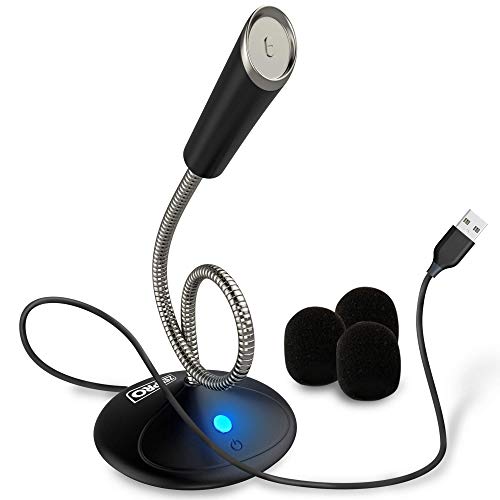 |
ZekPro USB Computer Microphone | ★★★★★ | Check Price |
| 2 |  |
TONOR Conference USB Microphone | ★★★★★ | Check Price |
| 3 |  |
KLIM Talk | ★★★★★ | Check Price |
| 4 |  |
JOUNIVO USB Computer Microphone | ★★★★★ | Check Price |
| 5 | 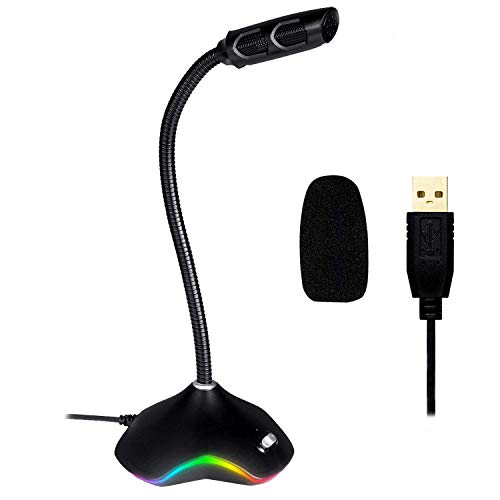 |
KLIM Rhapsody Microphone | ★★★★★ | Check Price |
| 6 |  |
Monoprice 114891 Paging Microphone | ★★★★★ | Check Price |
| 7 |  |
KLIM Voice V2 microphone | ★★★★★ | Check Price |
| 8 |  |
Pyle Desktop Gooseneck Wired Microphone | ★★★★☆ | Check Price |
| 9 |  |
TKGOU USB Computer Microphone | ★★★★☆ | Check Price |
| 10 |  |
CMTECK USB Computer Microphone | ★★★★☆ | Check Price |
1. ZekPro USB Computer Microphone — Best Overall
ZekPro USB Computer Microphone
We've got to start with the cheapest, and with a really affordable price tag, you really can't go wrong with this microphone from ZekPro.
Pros
- Built-in advanced noise-canceling technology
- No need to install any drivers
- Mute or unmute button with LED indicator
- One of the cheapest USB mics with push-to-talk features
Cons
- Gain control depends on software settings rather than hardware knobs
- Not compatible with most PA systems or mixers without adapters
Let’s start at the bottom of the price range, because ZekPro punches well above its tag. The built-in noise canceling is genuinely useful for voice recording, podcasting, and casual chatting, and the two included wind muffs knock down breath and wind noise without any extra accessories.
Setup is painless. There’s a built-in sound card on board, so you won’t have to hunt for drivers, even if your laptop has been giving you trouble with audio gear in the past.
A small LED indicator shows whether the mic is muted or live, and the same button handles on/off duty.
The stem is flexible enough to aim wherever you need, and compatibility covers Windows 7, 8, and 10, macOS, and PS4. Since it’s a plug-and-play design, you just drop it on the desk and start talking.
That makes it a natural fit for YouTube streamers, Skype and Zoom calls, Twitch, FaceTime, and gaming sessions.
It’s also lightweight and ships with a travel bag, so tossing it into a laptop sleeve for a trip isn’t an issue. For the money, the sound quality is better than it has any right to be.
2. TONOR Conference USB Microphone — Runner Up
TONOR Conference USB Microphone
TONOR Conference microphone is an omnidirectional condenser microphone, which means it can pick up sound with equal gain from 360 degrees.
Pros
- Blue LED indicator shows at a glance when the mic is active
- 360-degree omnidirectional pickup covers everyone at the table
- 11.5-foot pickup radius captures voices across the room
- One-touch mute button for instant privacy during calls
Cons
- Audio quality capped by USB bus power limitations
- Cable length restricts placement options without a USB extension
TONOR’s Conference mic is an omnidirectional condenser, meaning it grabs sound with equal sensitivity from all 360 degrees around the capsule. That makes it an obvious pick for group calls, where nobody should have to lean forward just to be heard.
Beyond conferences, it’s equally at home with seminars, announcements, training videos, vlogs, and business negotiations. Like the ZekPro, it plays nicely with Windows and macOS with no driver install required.
The unit itself is compact: roughly three and a half inches square and about three-quarters of an inch tall. Out the back is a thick strain relief and a six-and-a-half-foot braided nylon USB cable that resists tangles and handles a lot of abuse.
A Velcro tie keeps the cable tidy between uses.
Power comes via a touch button on the front. Tap it to toggle, and the built-in blue LED lets you see its state from across the room.
The underside has an anti-slip pad plus two mounting points for hanging or fixing the mic in place, which helps in boardroom setups.
The housing is solid metal, so durability isn’t a worry. It’s flat enough to slip into a bag, too.
The one catch: there’s no adjustable stem, so if you work at a particularly low desk you may end up angling it manually.
3. KLIM Talk — Best Value
KLIM Talk
Are you situated in a city wherein there's a loud vehicle horn, or in a countryside wherein there's a constant rooster crow?
Pros
- KLIM backs it with an industry-leading 5-year warranty
- Patented audio filter technology eliminates background noise
- Tank-like metal body survives drops and daily desk abuse
- Built-in anti-pop filter reduces plosives without extra gear
Cons
- Warranty coverage is limited to manufacturing defects only
- No dedicated carrying solution included for transport
Are you situated in a city wherein there’s a loud vehicle horn, or in a countryside wherein there’s a constant rooster crow?
Wherever you are, it won’t be a problem anymore because this KLIM talk microphone has a patented audio filter that delivers outstanding audio quality, and it broadcasts your voice with precise accuracy.
It focuses only on your voice and reduces background noise.
Now, your friends, teammates, or co-workers can hear and understand you during video call meetings.
It’s well-designed for professionals, especially those who work from home.
If you are a transcriptionist, this will make your job fast and easy because this microphone works well with apps and platforms with speech recognition technology such as Cortana, Dragon Naturally Speaking, Google Docs Voice, etc.
If you’re attending online courses and answering job interviews, then this microphone will meet all your needs.
This one’s also compatible with Windows and Mac operating systems. You can plug and play, no need for driver installations.
It’s very accessible and convenient due to its adjustable stem, soft on/off buttons, and anti-pop filter.
In terms of durability, the KLIM technologies boast that this product is as reliable as a tank, giving you a five-year warranty, which guarantees that they are confident in their work.
However, it doesn’t have a built-in light indicator, but it has a pleasing design, so you can never be shy having it on your desk.
4. JOUNIVO USB Computer Microphone — Top Pick
JOUNIVO USB Computer Microphone
JOUNIVO is also an omnidirectional condenser microphone like the TONOR microphone, but this one's adjustable.
Pros
- Full 1-year warranty covers defects and malfunctions
- LED indicator shows mute status at a glance during calls
- Noise-canceling technology
- Rotary volume knob gives you precise gain control on the fly
Cons
- No XLR output limits use with professional audio interfaces
- Latency can be noticeable on older computers
JOUNIVO is another omnidirectional condenser, much like the TONOR, but with one big advantage: the gooseneck flexes a full 360 degrees. Finding a sweet spot for your voice is just a matter of bending it into place.
For the price, you’re getting noise-canceling circuitry that picks up speech cleanly while tamping down ambient noise, which is tough to find in this budget tier. Mute and unmute buttons sit right up front, and the built-in LED glows red when muted and green when active so there’s no guessing.
What sets it apart from most mics on this list is the volume knob. Having hardware-level gain control beats fumbling through Windows audio settings in the middle of a call.
Plug it in and you’re ready, since no drivers are required. Compatibility is broad on the major operating systems, though Raspberry Pi, Linux, and Android are left out.
The build uses a metal pipe with a heavy-duty ABS base, which keeps things stable and the sound consistent.
For a budget-friendly, no-fuss setup, it’s a natural fit. It works well for gaming, video calls, YouTube vlogs, live streams, and speech recognition tools like Dragon voice dictation and Cortana.
5. KLIM Rhapsody Microphone — Top Pick
KLIM Rhapsody Microphone
Do you want an excellent-looking microphone?
Pros
- Weighted base keeps the mic rock-steady on any desk surface
- Sleek matte finish looks great in any office or studio setup
- KLIM's 5-year warranty gives long-term peace of mind
- Priced well under $30 for a premium desktop microphone
Cons
- Documentation lacks detailed setup guidance for beginners
- Frequency response may not suit all voice types equally
If looks matter to you, the KLIM Rhapsody is one of the better-dressed mics on this list. It has a clean, elegant profile that fits any desk setup without looking out of place.
The RGB lighting on the base adds a subtle touch that streamers and gamers tend to love, and the mute and volume controls both have LED indicators so you can read the mic’s state at a glance. Audio quality holds up well beyond gaming, too.
I’d happily use it for conference calls, recording voice tracks, podcasting, or speech recognition tasks.
Setup takes seconds on both Windows and macOS with no driver install. The weighted base keeps the mic planted during use, and KLIM’s build quality feels a step above typical budget gear.
KLIM also backs it with a five-year warranty and a 30-day no-questions-asked return, which is rare in this price bracket. If you want something durable, good-looking, and versatile without spending much, this is an easy pick.
It slots in nicely for gaming, streaming, recording, Skype, FaceTime, Twitch, and speech recognition apps.
6. Monoprice 114891 Paging Microphone — Worth Considering
Monoprice 114891 Paging Microphone
Monoprice 114891 is the most expensive one on this list, do you want to know why?
Pros
- Powered using two AAA batteries
- Flexible gooseneck design
- Highly-rated and well priced
- Heavy base and sturdy build won't tip over during use
Cons
- Mounting thread size may differ from your existing gear
- Performance varies depending on the quality of your audio chain
Monoprice 114891 is the most expensive one on this list, do you want to know why?
Because you can speak and carry this microphone wherever you want, and it runs with just two AAA batteries.
If you are looking for a microphone that you can take everywhere, then this one’s perfect for you because this microphone can be wired or wireless.
This product is a good fit for vloggers shooting making content. You can place it on your table while you eat.
It’s like a portable microphone because it doesn’t require electricity.
Monoprice 114891 is a cardioid microphone, which means this is much better in reducing background noise and echoes than an omnidirectional microphone.
Its impressive audio quality is ideal for live recording sounds, music production, making announcements, and paging.
It has an on/off button and a professional-looking design.
You can take advantage of its flexible gooseneck stem which is designed for easy adjustments.
It has an XLR cable measuring 25 feet and a female XLR to male 1/4” Ts plug adapter.
You really can’t go wrong with the Monoprice 11489. It comes highly recommended by its users - shows just how much they’re satisfied with the product.
However, there’ll always be a noticeable difference between sounds and voices on a wireless microphone and those on a wired microphone. If cutting the cord matters to you, our radio microphone roundup has the wireless picks.
7. KLIM Voice V2 microphone — Worth Considering
KLIM Voice V2 microphone
Here's another promising KLIM product that offers excellent audio quality; it can transmit your voice without background noise.
Pros
- Crystal-clear voice transmission with zero background noise
- KLIM's 5-year warranty is the longest in its price class
- Solid metal base stays put on any desk or conference table
- Anti-pop filter cleans up plosives for smoother voice capture
Cons
- Warranty coverage is limited to manufacturing defects only
- No dedicated carrying solution included for transport
This is another KLIM entry worth a serious look, and it transmits voice cleanly without dragging background noise along with it. If you already own the original version, the V2 upgrade brings improved materials, a new coating, and better internal components, including an anti-pop filter that tames plosives.
Plug it into a Windows or Mac machine and you’re ready to go, with zero driver hassle. The KLIM Voice V2 is omnidirectional with a frequency response from 100 Hz to 10 kHz, putting it alongside the picks on our best microphone under 50 list.
Build-wise, the neck articulates so you can dial in the right position for your voice. The mute button lives on the neck, with a toggle switch on the base plus LED indicators and a volume adjustment.
The base itself is weighty enough that you won’t need a separate stand.
KLIM’s five-year warranty is the cherry on top, and it tells you they’re confident in what they’re shipping. For online teaching, training, or seminars, it makes sure nobody’s squinting at Zoom trying to hear you.
Gaming, recording, streaming, speech recognition, and podcasts all work just as well.
8. Pyle Desktop Gooseneck Wired Microphone — Worth Considering
Pyle Desktop Gooseneck Wired Microphone
Boasting of its professional sound quality is not enough, this audio microphone by Pyle Pro features high signal output and 200-ohm output resistance.
Pros
- High signal output and 200-ohm output
- Pyle Pro engineering delivers consistent, reliable performance
- Flexible gooseneck bends to your ideal speaking angle
- High-frequency response range
Cons
- Build quality may not withstand heavy daily use
- Included accessories are basic and may need upgrading
Pyle Pro doesn’t just talk up the sound quality here, they back it with high signal output and 200-ohm output resistance. Add an anti-pop filter for breath and plosive noise plus low-noise circuitry, and you get clear, transparent audio that holds up across a wide range of uses.
The 40 Hz to 16 kHz frequency response covers just about any speech or voice audio application. A flexible gooseneck handles positioning, and the uniform cardioid pickup pattern locks onto whoever’s talking while rejecting the room.
One thing that sets this one apart is the 26-foot professional-grade XLR to 1/4” cable included in the box. That kind of cable alone often costs more than the microphones earlier on this list.
You can hook it straight into speakers, amps, mixers, or recorders.
This is a natural fit for home karaoke, project studios, and live voice work. The rugged construction and steel mesh grill are built to take abuse on stage without flinching.
For desktop use, you’ll need a receiver and adapter, but once wired in it’s just as comfortable in home studios, conference rooms, streaming rigs, or Google Voice Search sessions.
9. TKGOU USB Computer Microphone — Worth Considering
TKGOU USB Computer Microphone
TKGOU microphone is a very affordable choice that has been recommended by customers.
Pros
- No software needed to install
- LED light shows active/mute status so you always know
- Noise-canceling technology
- Flexible gooseneck design
Cons
- Gain control depends on software settings rather than hardware knobs
- Not compatible with most PA systems or mixers without adapters
The TKGOU mic is an affordable pick that keeps showing up in customer recommendations, and the feature list holds up to the hype. There’s a patented audio filter dedicated to your voice plus an anti-pop filter for crisper results.
Like most of the picks here, it’s plug-and-play with no drivers required. Compatibility runs broad across Mac OS, Windows, Linux, and most USB devices, including gaming consoles.
The mute/unmute buttons are straightforward, and the built-in LED tells you the active status so there’s no second-guessing.
The construction mixes metal with heavy-duty plastic, which should hold up to normal daily use. The gooseneck bends through a full 360 degrees so you can aim the capsule wherever makes sense.
One downside worth noting: the cable is shorter than most of the other mics on this list, so it’s easy to pop loose if you roll your chair back. On the upside, TKGOU backs the mic with a 30-day unconditional return policy and two years of customer support.
It’s a solid match for YouTube recordings, Skype calls, video conferences, Google voice search, and speech recognition apps.
10. CMTECK USB Computer Microphone — Worth Considering
CMTECK USB Computer Microphone
CMTECK microphone is the most highly-rated because of its quality at a very affordable price.
Pros
- Onboard USB sound card means no audio interface required
- Eye-catching blue LED ring adds visual flair to your desk
- Built-in indicator LED lights
- Budget-friendly price with features rivaling $50 mics
Cons
- Audio quality capped by USB bus power limitations
- Cable length restricts placement options without a USB extension
CMTECK earns high marks for punching above its price tag, and the built-in CCS2.0 SMART CHIP does real work blocking background noise and echoes. The pickup pattern is omnidirectional, so if you need to cover an entire room rather than just your face, this is a good candidate.
There’s also a built-in sound card on board, so no driver install, and it plays nicely with Windows and macOS. A blue LED ring sits on the base, which is a nice touch if you work in a dim room and want some visual feedback.
The adjustable neck and broad base keep things stable, and little circular grip pads on the underside prevent it from sliding around when you reach for it. A side switch handles the LED lighting, and the triangular push-to-talk button has its own indicator so you always know if you’re live.
The USB cable is all plastic, but it feels solid enough that I’m not worried about it failing. The branding is subtle, which is honest: this isn’t meant to be a showpiece.
Design-wise it leans into the budget gaming peripheral look, black angular plastic with blue LEDs.
At the end of the day, it’s simple, easy to use, and versatile, and the audio quality is honestly better than a lot of pricier competitors. It’s a solid match for gaming, podcasting, YouTube videos, casual chats, or business meetings.
Frequently Asked Questions
What is the advantage of a push-to-talk mic over an always-on microphone?
A push-to-talk mic only transmits audio when you press the button, which prevents background noise, keyboard clicks, and breathing from being broadcast. This makes it ideal for gaming, conference calls, and any situation where multiple people share an audio channel.
Do push-to-talk USB microphones work with Discord and Zoom?
Yes, most USB push-to-talk mics are plug-and-play and work with Discord, Zoom, Teams, and other communication apps. You can assign the mute button on the mic or configure a keyboard hotkey within the app’s audio settings.
Can I use a push-to-talk microphone for paging or intercom systems?
Absolutely. Desktop gooseneck models like the Monoprice 114891 are specifically designed for paging and intercom use.
They feature a dedicated talk switch and are built to handle frequent pressing without wearing out.
Final Thoughts
Push-to-talk mics hand you full control over what gets broadcast and when, which is exactly what you want if you’ve ever been caught mid-cough on a Zoom call. The options above cover everything from gaming and conference calls to paging and live streaming, across every budget tier.
The trick is matching the mic to your actual use case: noise cancellation for a noisy home office, omnidirectional pickup for group calls, or a simple mute button if you’re mostly gaming.
The ZekPro USB Computer Microphone earns the top spot for its built-in noise-canceling technology, handy mute button with LED indicator, and plug-and-play USB setup at a very affordable price. If you need 360-degree pickup for conference calls, the TONOR Conference USB Microphone is a strong runner-up with an 11.5-foot pickup distance and a built-in indicator light.