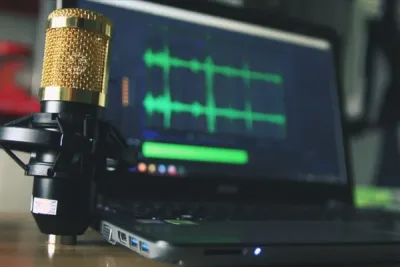


A boundary microphone is one of the most versatile tools you can add to a conference room, home office, AV rig, or sound stage. Pros reach for them when recording meetings, podium speakers, or live stages, but they’re just as useful if you’re working from home and want a cleaner option than a traditional stand mic.
The clever part is how they’re designed to sit flat against a surface. Tables, walls, ceilings, floors — drop a boundary mic on any hard surface and it captures the sound reflecting off it, which gives you a much more natural pickup than a regular condenser would.
You’ll find them in several polar patterns depending on what you need to capture. Cardioid and super-cardioid focus on one direction, while omnidirectional picks up sound from everywhere in the room.
That flexibility is what makes them so popular in multi-speaker environments.
Boundary mics are almost always condensers, which means they excel at picking up soft voices, reducing background noise, and amplifying subtle detail. The trade-off is that most require phantom power to operate.
Some are wired for faster, cleaner signal transfer, while wireless versions give you freedom in multi-purpose rooms at the cost of extra gear.
Quite a few of the picks below ship with USB connections, so you can plug one straight into your Mac or PC and jump into Zoom, Skype, or whatever conferencing app you rely on.
Quick Comparison Chart
| # | Product | Our Rating | ||
|---|---|---|---|---|
| 1 | 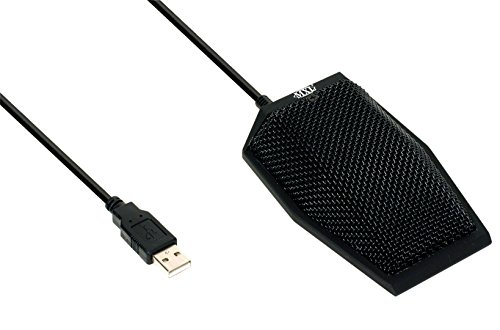 |
MXL AC404 USB Conference Microphone | ★★★★★ | Check Price |
| 2 |  |
Audio Technica Pro 44 Cardioid Condenser | ★★★★★ | Check Price |
| 3 |  |
Movo MC1000 Conference USB Microphone | ★★★★★ | Check Price |
| 4 |  |
CAD Audio USB U7 Boundary Condenser | ★★★★★ | Check Price |
| 5 |  |
Shure BETA 91A Half-Cardioid Condenser | ★★★★★ | Check Price |
| 6 |  |
Audio-Technica System 10 Boundary | ★★★★★ | Check Price |
| 7 |  |
Crown PZM30D Boundary Microphone | ★★★★★ | Check Price |
| 8 |  |
MAONO AU-BM10 Metal Boundary Desktop Mic | ★★★★☆ | Check Price |
| 9 |  |
MXL AC-424 Executive USB Conferencing | ★★★★☆ | Check Price |
| 10 | 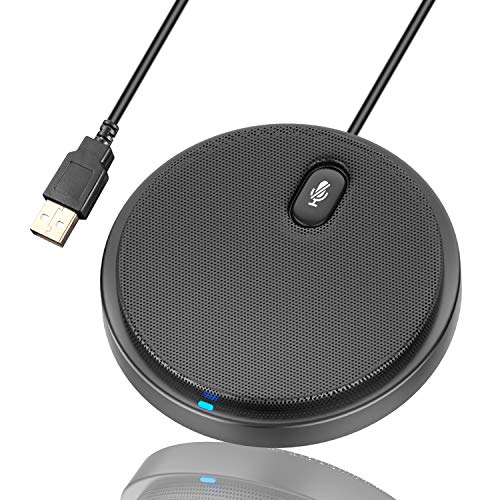 |
UNOOE Microphone | ★★★★☆ | Check Price |
1. MXL AC404 USB Conference Microphone — Best Overall
MXL AC404 USB Conference Microphone
Our top choice is the MXL AC404 USB Conference Microphone.
Pros
- Low-profile design sits inconspicuously on any conference table
- 6-foot USB cable with built-in speaker jack for monitoring
- Speech-optimized frequency response for crystal-clear voices
- 180-degree, 25-foot audio pickup radius covers entire rooms
- Plug-and-play USB requires zero driver installation
Cons
- Gain control depends on software settings rather than hardware knobs
- Not compatible with most PA systems or mixers without adapters
Taking the top spot is the MXL AC404 USB Conference Microphone, which hits that sweet spot between price, features, and quality that makes it an easy choice for anyone outfitting a personal conferencing setup. Most companies wouldn’t blink at buying these for employees, and that tells you a lot about where it sits in the market.
MXL has been a trusted name in pro audio for years, putting high-end gear in the hands of top musicians without the boutique price tag. They’ve been leaning into the podcasting and home-office market lately, and the AC404 is easily one of their strongest offerings for that space.
You’ll also see the MXL AC424 on this list. The two are close siblings, but the AC404 lands higher up because it’s cheaper and only really gives up one meaningful feature: the integrated mute button.
For smaller conference rooms, podcasting, or cleaning up your Zoom and Skype calls, the AC404 is an excellent swap for traditional dynamic stand mics and clip-on microphones that have been hard to get lately.
Despite its small footprint, the 3-capsule design captures a wide 25-foot cardioid radius — leagues ahead of whatever’s built into your laptop. It strikes a good balance between sensitivity and noise rejection, so different voices around a table stay distinguishable instead of blurring together.
Everything’s wired internally, so you don’t need to fuss with external phantom power or additional hardware. It includes a headphone jack, though it is missing that mute button — if that’s a dealbreaker, spend a bit more on the AC424.
Setup is genuinely plug-and-play on both Windows and Mac, no drivers or software required.
2. Audio Technica Pro 44 Cardioid Condenser — Runner Up
Audio Technica Pro 44 Cardioid Condenser
Our second choice is a favorite microphone for most professional audio installations.
Pros
- Professional PZM design for permanently installed AV systems
- Sleek, lightweight housing at just 0.4 lbs blends into any room
- TA3F to XLRM cable included for direct connection to mixers
- Cardioid pattern focuses on speakers and rejects ceiling noise
- Low-profile boundary design eliminates the need for a mic stand
Cons
- Humidity and moisture can damage the diaphragm over time
- Proximity effect can make bass overpowering at close range
Our runner-up is a staple of professional audio installations for good reason. Audio-Technica sits among the most trusted names in the industry, and the Pro 44 cardioid condenser delivers clean sound in a refreshingly low-profile package.
As a unidirectional cardioid condenser, it captures wide frequency range and nails sound quality in the details that matter. The sleek black housing is ideal if you’re adding another pickup to an installed system — conference tables, podiums, sound stages, you name it.
Honestly, it’s a smarter move than micing individual speakers around a room.
The pickup keeps background noise low, and with a little tuning you’ll get strong sound reinforcement without the feedback screech that ruins presentations. Keep in mind this is a traditional condenser design, so you’ll need phantom power, but that’s standard in most pro setups.
Audio-Technica ships it with a detachable 15-foot XLRM cable, which gives you plenty of slack when installing the mic wherever it needs to go.
3. Movo MC1000 Conference USB Microphone — Best Value
Movo MC1000 Conference USB Microphone
The Movo MC1000 Conference USB Microphone has plenty of features which makes it highly recommended as an at-home conferencing streaming alternative.
Pros
- Includes a 6.5-foot USB cable for flexible table placement
- Sturdy, rugged die-cast housing withstands office wear
- 180-degree pickup across a 20-foot radius for group calls
- Built-in headphone jack for private audio monitoring
- Works plug-and-play with Zoom, Teams, and Skype on any OS
Cons
- Driver support may vary across operating systems
- Cannot be used with standalone audio recorders
The Movo MC1000 earns its spot as our best-value pick by stuffing a surprising number of features into an affordable package. For at-home conferencing and streaming, it’s hard to argue with.
Despite the small footprint, the cardioid pickup covers a 20-foot radius at 180 degrees — more than enough for a home office or a small-to-mid-sized conference room. At half a pound with a solid mesh body and a stable base, it stays put on a desk without any extra tape or weights.
Onboard you’ll find an integrated headphone jack and an LED status indicator, though it’s missing a hardware mute button, so keep an eye on your call software instead. Movo includes a 6.5-foot USB cable that should reach most workstations, and setup is genuinely plug-and-play on Windows or Mac with no downloads needed.
One thing to flag: this mic is sensitive, especially in the low end. Rumble from air conditioning, traffic, or a subwoofer nearby can sneak into your calls, so a quieter environment helps.
When conditions are right, though, it captures professional-grade conference room audio at a price that’s hard to argue with.
4. CAD Audio USB U7 Boundary Condenser — Top Pick
CAD Audio USB U7 Boundary Condenser
CAD is another heaving-hitting professional audio manufacturer with a ton of experience in radio and broadcasting equipment that has recently been delving more into the home market.
Pros
- Omnidirectional 360-degree pickup captures every speaker at the table
- 10-foot USB cable reaches across large conference tables
- Modern triangular design doubles as a visual centerpiece
- Plug-and-play USB works on Windows and Mac without drivers
- Condenser element tuned for clear voice in speech applications
Cons
- No XLR output limits use with professional audio interfaces
- Latency can be noticeable on older computers
CAD Audio is another heavyweight in professional audio, with decades of experience building radio and broadcasting gear. They’ve been leaning into home-office products more recently, and the U7 is one of the more interesting results.
At its core, the U7 is an omnidirectional USB condenser that captures your voice across a full 360-degree field, wrapped in a surprisingly heavy metal body. It handles voice best, but under the right conditions it’ll pick up music decently too.
If you’re the type who paces or moves around during calls — personal trainers working from home, I’m looking at you — this is the mic you want. There’s a twist, though: the sleek triangular design is so discreet that guests on your calls may not even notice it’s there, which is either a feature or a disappointment depending on how proud of it you are.
CAD includes a generous 10-foot USB cable and an LED status light. Its frequency response is tuned for speech, so if music recording is your main goal, keep shopping.
For Zoom calls, Skype meetings, voiceover work for video, presentations, dictation, and general voice capture, this mic knows its lane and owns it.
At 9.6 ounces in a metal body, it’s built solidly enough to shrug off the occasional accidental knock — reassuring for anyone whose desk sees heavy daily use.
5. Shure BETA 91A Half-Cardioid Condenser — Top Pick
Shure BETA 91A Half-Cardioid Condenser
During COVID-19, many of us started a new hobby or returned to an old one, and if your hobby is drumming, then this might be the best microphone for you.
Pros
- Designed for inside kick drum placement with flat profile
- Two-position contour switch adjusts attack and tonal clarity
- Highest gain-before-feedback in its class for live stages
- Integrated preamp with XLR output for professional signal flow
- Half-cardioid pattern delivers focused low-end capture
Cons
- Picks up room reflections and ambient noise easily
- More fragile than dynamic mics -- not ideal for rough handling
During COVID-19, many of us started a new hobby or returned to an old one, and if your hobby is drumming, then this might be the best microphone for you.
Be a better percussionist, or just sound like it, with the Shure Beta 91A!
This condenser is designed to capture and amplify the sound from your kick-drum, making it a popular choice alongside dedicated drum mics.
This retro-styled mic has a half-cardioid polar pattern that reduces feedback and rejects off-axis sound so that, it will pick up your drum beats and nothing else.
The Shure Beta 91A is a hefty microphone with an integrated pre-amplifier, which saves you additional equipment costs and space on stage or in your living room.
The microphone’s price tag is a bit expensive, especially when compared to other simpler alternatives on this list, however, for the specific application of capturing your kick-drum, these specialized microphones can go much higher.
This microphone is a behemoth, weighing in at a full two pounds.
The Shure engineering team put in the effort and specifically designed and tuned the Beta for bass frequencies, it has a strong low-end response and high sound pressure levels (SPLs), so you can crank up your decibel output without fear.
If you’re looking to improve the punch of your bass drum, then consider adding this mic to your mix.
For your next drum solo video on YouTube or in the club, the Shure Beta 91A is an excellent balance between quality and price.
6. Audio-Technica System 10 Boundary — Worth Considering
Audio-Technica System 10 Boundary
The System 10 Wireless Boundary Microphone is a wireless microphone explicitly designed to work with the Audio-Technica System 10 wireless media platform.
Pros
- 2.4GHz wireless eliminates the need for frequency coordination
- Supports up to 10 simultaneous wireless mics in one room
- User-switchable modes for mute, talk, and push-to-talk
- Receiver mounts on a wall, ceiling, or sits flat on a table
- Battery-powered operation with long runtime per charge
Cons
- Rechargeable batteries lose capacity over time
- Range decreases significantly through walls and obstacles
The System 10 Wireless Boundary Microphone is built to work hand-in-hand with Audio-Technica’s System 10 wireless platform, so if you’re already running one, the ATW-T1006 slots right into your existing receiver and delivers clean, natural sound from day one.
Need to run several mics at once? The System 10 Pro handles up to 10 simultaneously, while the standard System 10 supports 8 — plenty of headroom for most setups.
You’ll find these systems all over corporate conference rooms, educational institutions, and small-to-mid-size venues running panel discussions, school lectures, and boardroom meetings.
The mic itself uses a cardioid pattern with 180-degree pickup, focusing on whoever’s in front of it while rejecting off-axis ambient noise. It operates on 2.4 GHz — no TV interference to worry about — and runs 24-bit/48 kHz digital wireless for crisp, detailed audio.
Power is flexible. The built-in rechargeable battery lasts around 9 hours on a charge via the included USB cable, or you can run it continuously from AC.
A user-configurable switch lets you choose between push-to-mute and push-to-talk modes, and LED status lights make sure you never get caught with a hot mic by accident.
Onboard gain adjustment lets you balance speakers with different vocal volumes, and the low-cut filter handles common low-frequency noise like HVAC rumble. All in, it’s one of the most customizable and well-controlled wireless boundary options you can buy.
7. Crown PZM30D Boundary Microphone — Worth Considering
Crown PZM30D Boundary Microphone
The Crown PZM30D is a variation of boundary microphones, known as the pressure zone microphone.
Pros
- Pressure Zone Microphone design with built-in boundary plate
- 360-degree hemispherical pickup captures the entire room evenly
- Studio-quality sound reproduction faithful to original tone
- Exceptional performance with percussion and piano recordings
- Wide 20Hz-20kHz frequency range suits both voice and music
Cons
- Warranty coverage is limited to manufacturing defects only
- No dedicated carrying solution included for transport
The Crown PZM30D belongs to a specific family of boundary mics called pressure zone microphones, and it’s a certified oldie-but-goodie — the kind of mic that’s been earning its keep in broadcasting, sound reinforcement, and professional sound stage recording for years.
That heritage doesn’t mean it’s locked to stages. Drop it in a boardroom, hang it overhead, or mount it anywhere you need wide sound capture and it’ll hold its own.
One of the clever touches is the dual-frequency response switch. Flip it to “R” (rising) for a clean, brilliant sound that works beautifully on high-definition musical instrument capture.
Flip it to “F” (flat) for natural voice applications like meeting recording.
Whether you’re micing an entire orchestra or zeroing in on a single instrument, the rising frequency setting delivers pristine capture that comes impressively close to ideal studio sound without distortion creeping in. Percussion is a particular strength — pianos and drums both come through with real definition and body.
The frequency response stretches from 20Hz to 20kHz with a 150dB max SPL, so you could record anything from a whispered monologue to the whine of a table saw (if that’s your thing on YouTube). Crown even includes a metal plate so you can suspend the mic above an orchestra pit, and it brings its own boundary surface along to amplify pickup.
Yes, it’s not cheap, but the sound quality honestly rivals microphones costing twice as much. One caveat: this is an XLR mic that needs phantom power, so plan on running it through a proper mixer or interface.
8. MAONO AU-BM10 Metal Boundary Desktop Mic — Worth Considering
MAONO AU-BM10 Metal Boundary Desktop Mic
MAONO is a company out of Africa that has made a name for themselves by producing electronic equipment for the gaming arena, and like other manufacturers on this list, they've jumped into the consumer
Pros
- All-metal boundary housing with a low center of gravity
- Omnidirectional condenser picks up every meeting participant
- USB plug-and-play works on any laptop without driver installs
- Affordable entry-level option for home office conference calls
- Low-profile form factor sits discreetly on any desk surface
Cons
- Build quality may not withstand heavy daily use
- Included accessories are basic and may need upgrading
MAONO originally made its name building gaming audio gear, and like several other manufacturers on this list, they’ve jumped into the home-conferencing market with both feet. The AU-BM10 is their budget-friendly take on a boundary mic, and it delivers reasonable quality without asking much of your wallet.
For the basics of conference calls, it covers everything you actually need. USB connectivity, a touch-sensitive mute button, and LED status lights give you the core functionality to live-stream Zoom and Skype calls cleanly.
The sturdy aluminum base and body also help it survive the inevitable knocks that come with daily desk use.
Pickup range is slightly shorter than some entries on this list at 10 feet, but honestly, that’s plenty for a typical home workstation — and a tighter pickup actually helps cut down on ambient noise without any active processing. MAONO includes an integrated headphone jack and a 5-foot USB cable, though you may want a longer cable for some setups.
The shallow round profile keeps it discreet on the desk during meetings or recordings, and at just 6 ounces it stays put without feeling flimsy. Strictly for dictation, meetings, and general voice work, it’s a solid pick.
The limited frequency range means it’s not the one to reach for when you’re recording music or anything studio-adjacent.
9. MXL AC-424 Executive USB Conferencing — Worth Considering
MXL AC-424 Executive USB Conferencing
As we know, MXL is a high-end professional manufacturer playing in the home-user space, and with the AC-424, they have another excellent choice for conference calls.
Pros
- Executive-style low-profile design matches boardroom aesthetics
- USB output with integrated headphone monitoring jack
- 25-foot audio pickup range covers large conference rooms
- One-touch mute button for instant privacy during calls
Cons
- Gain control depends on software settings rather than hardware knobs
- Not compatible with most PA systems or mixers without adapters
MXL’s second entry on the list is the AC-424, a clear step up from the AC-404 for anyone who wants those extra conference-friendly features. It’s another strong option for home-office video calls that benefits from MXL’s broader pro audio pedigree.
You can tell MXL thought about the needs of work-from-home meeting regulars when designing this one. There’s a big backlit mute button right on top and a headphone jack built in — two things you’ll genuinely appreciate during back-to-back calls.
Like the AC-404, the AC-424 uses a cardioid pattern with 180-degree pickup and a surprising 25-foot range. The internal electronics are essentially identical to the cheaper AC-404, so if you can live without the mute button and monitoring jack, that model saves you a few dollars for the same core sound.
The low-profile curved body keeps it inconspicuous on a workstation while still looking polished, and the audio quality is a genuine step up from whatever’s baked into your laptop. For Zoom, Skype, and other meeting platforms, the AC-424 hits a sweet spot on features, portability, and speech clarity.
10. UNOOE Microphone — Worth Considering
UNOOE Microphone
UNOOE is a manufacturer out of China, so you may have seen them producing various electronics and consumer products, from iPhone AUX cables and HDMI splitters to Smart Home devices and Video/Audio Equ
Pros
- Compact round boundary design with 360-degree pickup coverage
- Integrated mute button for quick privacy during calls
- USB plug-and-play connection with no drivers required
- Condenser capsule optimized for clear voice reproduction
- Rubber base prevents sliding and reduces desk vibrations
Cons
- Shielding may not fully block interference from nearby power cables
- Color coding fades after extended use and cleaning
UNOOE is a Chinese brand you’ve probably seen on everything from iPhone AUX cables and HDMI splitters to smart home gadgets and consumer audio/video gear. Their budget boundary microphone is a reasonable pick for laptop conferencing when you don’t want to spend much.
It’s an omnidirectional unit with a 360-degree pickup reaching about 10 feet — enough for a small room or a home office. The compact metal body and anti-slip base echo the design language of higher-end models, even if the internals don’t fully match.
Dynamic noise reduction is built in at a basic level to handle background sound, so your voice stays clear from anywhere in the room. Up top you’ll find an integrated mute button and an LED status indicator for at-a-glance confirmation.
It’s not going to outperform the premium mics on this list, but depending on what you need, it may be all the microphone you’re looking for at its price.
Frequently Asked Questions
Where should I place a boundary microphone for best results?
Place it flat on a hard, smooth surface like a conference table, stage floor, or podium for the best pickup. The mic uses the surface as a natural sound reflector, so a larger flat surface gives you better low-frequency response and more consistent audio quality.
Can I use a boundary microphone for recording music?
Yes, boundary mics are commonly used for recording kick drums, piano, and choir performances. The Shure BETA 91A, for example, is designed specifically to be placed inside a kick drum for tight, punchy sound capture that works great in live and studio settings.
What is the difference between a boundary microphone and a regular desk microphone?
A boundary mic lies flat on a surface and picks up sound from a wide area using the surface reflections, while a regular desk mic sits upright and typically captures sound from a narrower direction. Boundary mics are better for group conference calls and room coverage, while desk mics are better for individual speakers.
Final Thoughts
Choosing the right boundary microphone isn’t nearly as complicated as it might sound at first. The trick is knowing your budget, your use case, and accepting that in audio gear, cheaper rarely means better in any meaningful way.
Even for simple voice work, the right mic can make your home office sound almost professional — lifting your voice while quietly rejecting the noise around you. My take?
A well-placed boundary mic is one of the most underrated upgrades a work-from-home setup can get.
These mics handle an impressive range of sources, from conversational audio and footsteps on a stage to a kick drum in the middle of a live set. If you’re working in a professional recording or broadcasting context, lean toward trusted manufacturers whose gear holds up over years of daily abuse.
For musical applications, pay extra attention to gain-before-feedback specs and placement strategy — that’s where the difference between muddy and pristine capture actually lives. Whichever direction you’re going, there’s no shortage of solid options on this list to pick from.
The MXL AC404 USB Conference Microphone earned our top pick for its 180-degree, 25-foot pickup radius, USB plug-and-play simplicity, and excellent speech clarity. If you need something designed for permanent installation in a professional AV setup, the Audio Technica Pro 44 Cardioid Condenser delivers studio-grade sound in a sleek, lightweight package.